When was the last time you had your eyes checked? Many people spend hours every day using smartphones, computers and televisions but may not pay enough attention to changes in their vision
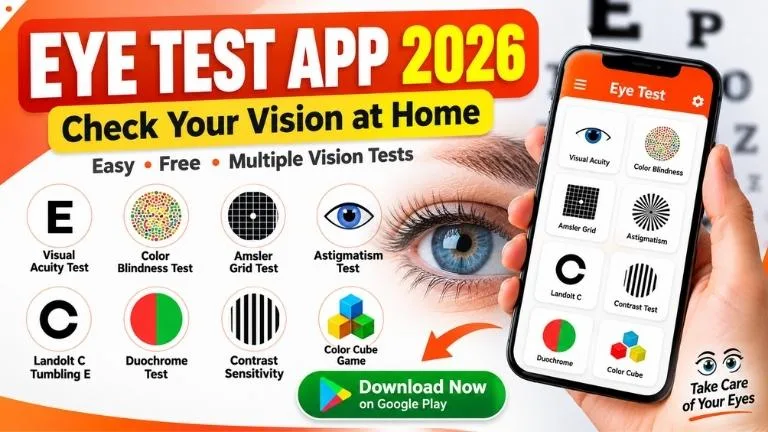
Eye Test is a mobile application designed to provide simple vision screening activities on your smartphone. It includes several types of tests related to visual acuity, color vision, contrast sensitivity and other aspects of vision
Important: A mobile eye test cannot diagnose an eye disease and should never replace an examination by a qualified eye-care professional. Screen size, brightness, viewing distance and device settings can affect results.
“બાળવૃંદ Excel + PDF + HTML Download”
Eye Test App – Quick Overview
| App Information | Details |
|---|---|
| App Name | Eye Test |
| Category | Health & Vision |
| Purpose | At-home vision screening activities |
| Tests | Multiple vision-related tests |
| Availability | Android |
| Download Source | Google Play |
What Can You Check With the Eye Test App?
The application includes different screening activities that may help users notice possible changes in their vision. Available features can vary depending on the current version of the app.
- Visual Acuity Test
- Ishihara Color Vision Test
- Color Cube Game
- Amsler Grid Tests
- AMD-related Screening
- Glaucoma Questionnaire
- Contrast Sensitivity Test
- Landolt C / Tumbling E Test
- Astigmatism Test
- Duochrome Test
- OKN Strip Test
- Red Desaturation Test
Understanding the Main Eye Tests
1. Visual Acuity Test
- Visual acuity describes how clearly you can see details. Similar measurements are commonly included as part of a professional eye examination.
- A smartphone-based test may provide a basic screening experience, but the result can be affected by screen size, viewing distance and display settings.
2. Color Vision Test
The app includes an Ishihara-style color vision test. Ishihara plates are commonly associated with screening for red-green color vision deficiencies.
If you repeatedly have difficulty identifying the patterns, consider discussing the result with an eye-care professional rather than relying only on the application.
3. Amsler Grid
- An Amsler grid consists of horizontal and vertical lines with a central fixation point. It can be used to notice distortion or missing areas in central vision.
- Remember: An unusual result on an Amsler grid does not by itself establish a diagnosis. New or sudden visual distortion should be evaluated professionally.
4. AMD Screening
Age-related macular degeneration, commonly called AMD, affects the macula and can affect central vision. The app provides screening-related activities, but it cannot confirm whether someone has AMD.
5. Glaucoma Questionnaire
- Glaucoma refers to a group of eye conditions that can damage the optic nerve. Some forms may progress without obvious early symptoms.
- A questionnaire on a phone cannot rule glaucoma in or out. Professional evaluation may include eye-pressure measurement and examination of the optic nerve and visual field.
6. Contrast Sensitivity
Contrast sensitivity refers to the ability to distinguish an object from its background when the difference between light and dark is relatively small.
7. Landolt C and Tumbling E
- These optotypes can be used for visual-acuity screening without requiring the user to read ordinary letters. The user typically identifies the direction of an opening or the orientation of a symbol.
8. Astigmatism Test
Astigmatism is a common refractive condition that may contribute to blurred or distorted vision. An on-screen pattern may help with basic screening, but an eye examination is required for proper assessment and prescription.
9. Duochrome Test
- A duochrome test uses red and green backgrounds as part of refractive assessment. Results from a phone should not be used to determine or change an eyeglass prescription on your own.
10. Red Desaturation Test
This test compares how red colors appear between the eyes. A noticeable difference can have different causes and requires professional interpretation if it is persistent or concerning.
How to Use an Eye Test App Safely
For better consistency:
- Use the app in a well-lit room.
- Keep screen brightness at a comfortable level.
- Follow the distance instructions shown by the app.
- Test one eye at a time when instructed.
- Do not press or rub the covered eye.
- Repeat a test if you believe you misunderstood the instructions.
Results obtained from different smartphones or tablets may not be identical because displays have different sizes, resolutions, brightness levels and color reproduction.
Can an Eye Test App Replace an Eye Doctor?
No. Smartphone tests are best treated as screening or educational tools. They cannot provide the complete examination required to diagnose many eye conditions or accurately prescribe glasses or contact lenses.
- If the application indicates a possible problem, the appropriate next step is to arrange an examination with a qualified eye-care professional.
When Should You Get Your Eyes Checked?
- Consider seeking professional eye care if you notice persistent blurred vision, difficulty seeing at distance or near, frequent visual discomfort, changes in color perception or other ongoing changes in your sight.
- Seek urgent medical care for sudden loss of vision, a sudden major change in vision, severe eye pain, significant eye injury, or other rapidly developing eye symptoms.
Eye Test App Download
The Android version of Eye Test can be obtained through Google Play. Check the current Play Store listing for the latest version, features, privacy information and device compatibility.
Tip: Prefer downloading mobile applications from trusted official app stores instead of unknown APK websites.
Frequently Asked Questions
Is the Eye Test app free?
The app may provide free features along with advertisements or optional paid/in-app features. Check its current Google Play listing for the latest details.
Can I check my eyesight using my phone?
A smartphone can be useful for basic vision screening, but it cannot replace a comprehensive professional eye examination.
Can this app tell me my glasses prescription?
- You should not use a mobile screening result to independently determine or change an eyeglass or contact-lens prescription. A qualified professional should perform the appropriate refraction and eye examination
What should I do if I get a poor result?
- Repeat the test carefully according to its instructions. If the result remains unusual, or if you are experiencing vision symptoms, consider arranging a professional eye examination.
Eye Test can be a convenient way to explore basic vision screening from a smartphone. Its different tests may help increase awareness about eyesight, but the results should be treated as informational rather than a medical diagnosis.
For more useful apps, digital tools, education updates and technology guides, visit https://gujratisaral.school/
Medical Disclaimer: This article is provided for general educational and informational purposes only. It is not medical advice, diagnosis or treatment. Mobile vision tests can be affected by device and testing conditions. Consult a qualified healthcare or eye-care professional for concerns about your vision or eye health.

Gujrat Saral School 🌐📚
ગુજરાતી શિક્ષણ સામગ્રી, નિબંધ, પ્રશ્નપત્ર, માર્કશીટ અને શિક્ષણ અપડેટ્સ માટેની સરળ વેબસાઈટ. ✨
🔹 અભ્યાસ સામગ્રી
🔹 શિક્ષક ઉપયોગી માહિતી
🔹 પરીક્ષા & મોડેલ પેપર
🔹 નવીનતમ શિક્ષણ અપડેટ્સ